

You know those session confirmation emails? The ones you send after a booking comes in to make sure the client has the details, feels good about everything, and knows what to expect? I used to write those myself. By hand. Like some kind of Victorian correspondent dipping a quill. Not anymore. Here is the email I just sent to my next client:
Hey!! 😊📸 So SO excited 4 ur session tmrw!! It is gonna b so MAGICAL and honestly so transformative 🌟✨ like I literally cannot believe we get 2 do this!!! The light at ur location is gonna b PERFECT and we r gonna create such amazing memories together!!! 🚀🙌📷📷📷 lol see u soon!!
“Thank you for letting me know about Buddy’s mobility problems. I will work within his comfort zone but it helps me to prepare for the session.”
Cant wait!!!!! 🐾💫🎉
...anyway. AI is amazing for emails!!
Okay. I’ll stop.
That one sentence about Buddy is the only part of that confirmation I actually wrote. Everything else is what happens when you hand a prompt to an AI tool with no context and accept whatever comes back. If you’ve been reading this newsletter from the beginning, you probably felt something shift when you hit that sentence. That shift is the whole point of this issue.
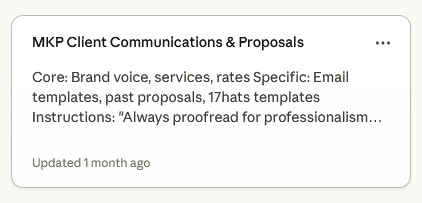
Using AI for correspondence and other business copy is genuinely a great entry point, for photographers and pretty much anyone else running a small business. The time savings on routine communication are real and the barrier to starting is low. But as with most things worth doing, the more work you put into setting it up properly, the better your results will be. The difference between that email up there and something you would actually send a client is not the AI tool. It’s the infrastructure you build around it.
Before we get into what that infrastructure looks like, it’s worth spending a moment on the tools themselves, because they are not interchangeable and the choice matters.
A Quick Orientation to the Main Players
The landscape as of early 2026 has a few dominant tools, each with a distinct character.
ChatGPT (OpenAI) is the most widely recognized name and has a massive user base. The current model is GPT-5.4, and it is capable across a wide range of writing tasks. Its broad training makes it strong for general business writing and it handles long-form content well. A free tier exists with usage limits; paid plans (Plus, Pro) unlock the more capable models and higher usage limits.
Claude (Anthropic) tends to produce writing that reads more naturally and has stronger instincts around tone and nuance. For work where voice consistency matters (which, as you’ll see, is the entire argument of this issue) it is worth serious consideration. It also handles long documents and complex context well, which becomes important once you are working with detailed style guides. A free tier is available; paid plans (Pro, Max) unlock higher usage limits and more capable models.
Gemini (Google) comes in two meaningfully different versions and it is worth understanding the distinction. The free chatbot at gemini.google.com is capable for general tasks. The Workspace-integrated version, built into Gmail, Docs, Drive, and Sheets, requires a paid Google Workspace subscription and is where the real productivity integration lives. If your business already runs on Google, that integration can be genuinely useful.
Microsoft Copilot is worth mentioning specifically because it is included with Microsoft 365 business subscriptions, which many photographers and small businesses already pay for. If you have an active Office subscription, you may already have access to Copilot inside Word, Outlook, and other apps without realizing it. It is worth checking before paying for a separate tool.
A Note on Free vs. Paid, and Why Privacy Should Be Your First Question
The two most visible differences between free and paid tiers across most tools are usage limits (paid plans give you more capacity before you hit a wall and have to wait) and model quality (paid plans generally access the more capable, current models). Both matter for photographers doing real business work. But there is a third difference that matters more than most people realize, and it is the one least likely to appear in the feature comparison tables: what happens to your data.
Across nearly all of these platforms, free tiers and some paid consumer tiers default to using your conversations to train future models. That means the inquiry you paste in, the client details you reference, the pricing strategy you think through out loud, all of it can become training data. Paid business tiers, by contrast, typically prohibit this by contract. The details vary by platform and change frequently, but the pattern is consistent: paying for a consumer plan buys you features, not necessarily privacy. Paying for a business tier buys you both.

This matters for photographers specifically because our work involves client information. Buddy’s mobility problems are not mine to share with a model’s training dataset.
The industry is moving fast and privacy policies are changing faster than most users realize. Before you settle into a workflow with any of these tools, read the current privacy policy for the tier you are actually using. Not the marketing page, the actual policy. It takes fifteen minutes and it will tell you exactly what you are agreeing to. Or pretend like you are an AI pro, feed it into the chatbot, and ask it to summarize the main points. You’ll get the gist. But no, seriously, do your due diligence - your customers won’t thank you but it’s the right thing to do.
Which One Do I Actually Use?
Mostly Claude, and I’ll tell you why, because I have spent real time with all of them and the reasons are specific rather than arbitrary.
The voice work is the biggest factor. I maintain detailed writing guides and project knowledge that I use across sessions, and Claude handles that context in a way that makes it feel more like a working partner than a prompt-and-response machine. I have run the same voice style guide through Gemini and gotten noticeably more generic results. That gap matters when the whole point is output that sounds like you.
The second reason is reliability on facts about my own business. This sounds like a low bar but it is not. Gemini, with some regularity, will invent details when generating business content: a street address that doesn’t exist, a staff member I’ve never had. Each of those is obvious when it surfaces, which is exactly the problem. If a tool is confidently fabricating things I can easily verify, I have no way of knowing what else it’s gotten wrong that isn’t as visible. That uncertainty is too expensive when I’m using the output in client-facing work.
There is more to say about Claude specifically, including some tools that are worth their own dedicated issues down the road. For now, I will just say: try them all. My experience is my experience. The right tool for your workflow is the one that gets you the output you can actually use.
The Part Everyone Skips
Here is what most photographers do when they discover AI tools are useful for writing: they start prompting. They type “write a session confirmation email for a pet photography client” and they get something back and they either use it, tweak it a little, and move on.
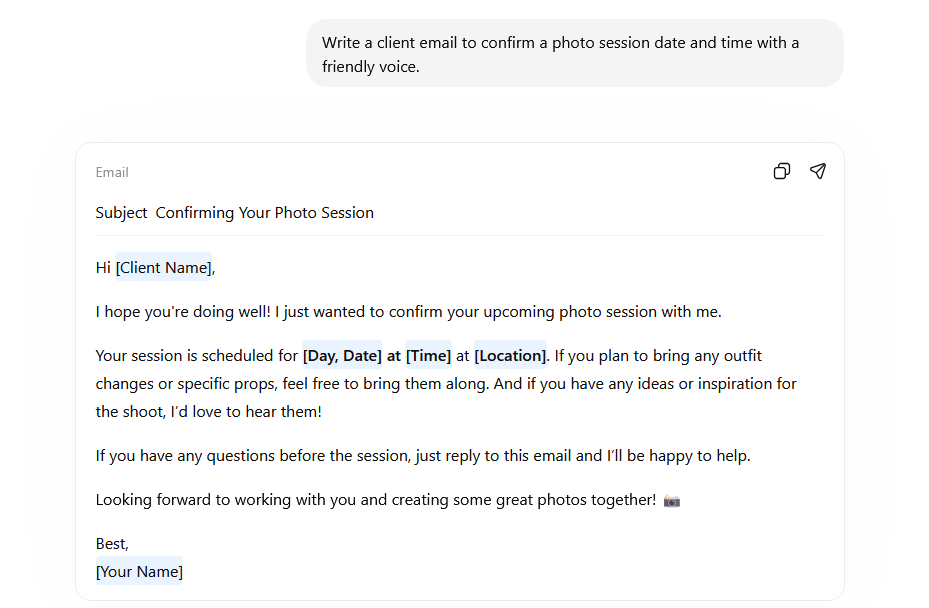
The results are fine. Serviceable. Occasionally they produce the word “magical.”
What they do not do, and what almost no one does at first, is spend time teaching the tool how they actually write. That gap is exactly where the generic output lives.
Training an AI model on your voice is not a technical process. You do not need to fine-tune anything or understand how large language models work. What you need is documentation: a written record of how you communicate, what words you use, what constructions you avoid, and what your writing sounds like when it is working. A writing guide, built specifically to give an AI tool the context it needs to produce output that sounds like you rather than like everyone else who used the same prompt today.
The reason this matters more than most photographers realize is that AI tools are, at their core, pattern-matching systems. Without context, they match to the average of everything they have ever been trained on. “Session confirmation email” drawn from the average of all professional correspondence produces something enthusiastic, slightly generic, and apparently quite fond of emojis. With context, with a detailed brief about your voice, your tone, your specific prohibitions, and your communication style, the same tool produces something that could plausibly have come from you.
The good news is that you set this up once and then refine it. You do not need to have it perfect before you start. Build a first version, use it for a few weeks, and pay attention to where the output still sounds off. That is your edit list. The guide improves naturally as you use it, and it pays forward into every piece of writing you produce after that.
That one sentence about Buddy came from knowing specifically how I communicate with clients: directly, with useful information, no performance of warmth, no unnecessary punctuation. The AI did not produce that sentence. I did. But with the right documentation in place, it would have.
Building that documentation, what it includes, how to construct it, and how to actually put it to work in your workflow, is what we are covering next issue. What I want to leave you with here is the framing: the time you spend on this is not setup time. It is the work. Everything downstream of it gets easier and better in proportion to how seriously you take it.
The session confirmation email is a trivial example. But the same principle applies to your inquiry responses, your blog posts, your LinkedIn content, your client follow-ups, your pricing conversations. All of it. The voice infrastructure you build once does that work across everything, which means the return compounds in a way that no individual prompt ever will.
Before Next Issue: Some Homework
You have two weeks before we get into building the actual documentation. That is enough time to do something useful with each of the tools above, even briefly.
Pick one or two you have not spent real time with and run the same task through each of them. A session confirmation email works fine. A draft inquiry response works too. The specific task matters less than using something you actually know well enough to evaluate the result.
What you are looking for is not which output is best. You are looking for where each tool feels clunky, where it misses something obvious, where it produces language you would never use. Those friction points are going to be useful context when you sit down to build your own voice guide, because a good guide is partly a list of exactly what to correct for.
Come back with a feel for the tools. The methodology will make a lot more sense when it’s solving problems you’ve already run into.
One more thing before I go. I told you I only wrote that one sentence in the confirmation email. That’s true of this entire post. I told Claude what I wanted to say, made a few corrections along the way, and what you just read is genuinely my voice, my examples, my thinking throughout. The methodology I’m describing is the methodology I used to write the issue describing it. That’s not a disclaimer. That’s the point.
The photographers who figure this out early will look, to everyone who did not, like they have some kind of magical AI setup.
They will just have done the unglamorous part first.